
Hi there…I have been looking around for XSS related information and most of the demos I saw are either around displaying an alert in a web page or too advanced for a beginner like me. So as a toddler in the security world I tried to create my own dummy application to see how this attack is executed. What I write below is a documentation of my learning: there may be faults as I am still learning.
So feel free to drop a comment incase anything is not correct, I will surely incorporate any suggestions.
Cross Site Scripting – A little exploit demo to help understand the basics of this attack – I
Application background:
1. We have a simple web forum that uses Form based authentication.
2. The users can comment on the topics discussed by other users.
3. New users visiting this site are required to register by creating a new user name and password.
4. A registered user can: view/write the posts, write comments on the posts and view the comments written by other users.
5. The following code snippet is added to the web.config file for this application. Please note that when request validation is disabled, any content can be submitted to a page; it is the responsibility of the page developer to ensure that content is properly encoded or processed.

Use Scenario:
1. A malicious user registers and logs in to the forum.
2. He picks a topic and clicks on Write comments. Here is what he writes and submits:

This comment will appear as below on the view comments page:
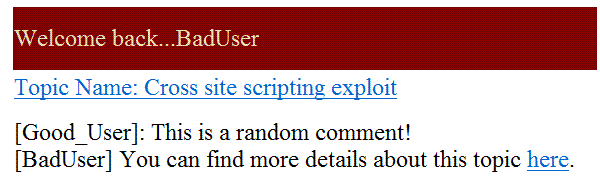
To a normal user this looks like a perfectly harmless piece of text that directs you to another location that has more information around, eh…well Cross Site scripting exploit!
So a good user (let’s call him GoodUser) logs in and clicks on the hyperlink “here” to get some more information around this type of exploits. Here is what he will see:

In our example we used a simple alert statement but in real world scenarios this can contain scripts that can steal your cookie, other important information, etc. These stolen information can be used to impersonate a user, launch a more knowledgeable attack on the application or its user and also can case loss of data that can have financial and reputational implications on both the end user as well as the web site owner.
Hope someone will find this useful to understand how XSS can be exploited. I will posting my rendezvous with XSS.
Happy Reading!
 Random Thoughtz