GameSec – Unity3D – 1

Unity’s documentation is pretty good for the developers who want to create cool games, but ones on the critical supporting features like security are not very detailed. Make no mistake, Unity does have good security features like the web player sandbox that helps maintain the security posture but I feel the documentation coverage on these needs to be more detailed.

As I try to get more acquainted with Unity’s world of game development I am taking some notes on the questions I had, and kind of got answers to. And hence the ramblings below 🙂

Unity Security – Permissions Policy files

There are two security policy files that control the access permissions on content that a Unity web player is allowed to access, or not. These are: crossdomain.xml and socket security policy file.

Difference between crossdomain.xml file and the socket security policy file.

The crossdomain.xml file affects HTTP, HTTPS and FTP access to content on a server and it has no effect on restrictions to be imposed for socket connections. To impose restrictions for socket connections, a socket policy server is required to allow, or disallow, Unity web player based socket access.

Does Unity use/require both crossdomain.xml as well as the socket security policy files?

Yes! While both the files use the same policy schema, the crossdomain.xml file only defines permissions on the web services hosted on the server where the crossdomain.xml file is placed, the socket security policies apply to all TCP/UDP socket connections to that server.

For Unity, the http served policy file, crossdomain.xml, is relevant for WWW class in the UnityEngine namespace. For domains different from the domain that is hosting the unity3d file, the Unity web player expects the crossdomain.xml file to be available on the domain it wants to access with the WWW class.

Unity Socket Connections

Before Unity web players can connect to any serve, like the ones on the networks, it is required that the hosts permit such connections. The hosts can manage the socket level connection permissions using the socket policy file.

This socket security policy file is by default hosted by the target host on port 843.

Note: The socket security policy file can be hosted on other ports as well. The functional difference with a non-default port is that it must be manually fetched with Security.PrefetchSocketPolicy() API call and if it is hosted on a port higher than 1024 the policy can only give access to other ports higher than 1024.

A Socket policy file defines what hosts (think client) can connect to a system (think server) and to which ports those hosts are permitted to connect.

The format used for the Unity socket policy file is similar to that used by the Flash player. The schema of the file is as below:

<?xml version=”1.0″ encoding=”ISO-8859-1″?> 

<!ELEMENT cross-domain-policy (allow-access-from*)>


<!ELEMENT allow-access-from EMPTY>

<!–ATTLIST allow-access-from domain CDATA #REQUIRED>

<!–ATTLIST allow-access-from to-ports CDATA #REQUIRED>


Example Unity security socket policy file:

<?xml version=”1.0″?><cross-domain-policy>

<allow-access-from domain=”*” to-ports=”80, 443″/>

</cross-domain-policy>”


This policy effectively says “Content from any domain is free to make socket connections at ports 80 and 443”. The Unity web-player will reject any attempted socket connections using a port outside that range and will throw a SecurityException.

Note: The to-ports field in the allow-access-from element in the socket security policy file specifies what ports are available to the Unity web player trying to connect to the server. While wildcards (“*”), port ranges, and/or individual ports can be specified within this field, it recommended that administrators specify only those ports for which they explicitly want to allow access to the connecting web player.

The main points of distinction between the Flash and Unity socket security policy file are:

  1. A limitation with the Unity’s socket policy file vis-à-vis Flash socket policy file is that Unity web player only supports “*” as a valid value for the domain setting. The implication is that any web player in the wild can attempt to establish socket connectivity to the server.
  2. The Unity webplayer does not support the and tags.


To be continued…
 

CORS – Cross Origin Resource Sharing – A Simple Example

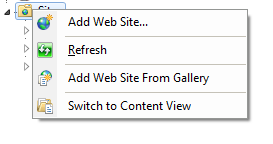
Local setup (I did it on Windows 7 and IIS): 1. Created two websites made to run on two different ports. In IIS a new website can be created using the option shown the screen shot below: clip_image001 A note about Same Origin: Note that most of the modern browsers define the following combination as “same origin” – Scheme (protocol), domain and Port number. As far as I know Internet Explorer tends to behave differently as it did not consider the port number but my memory may need a refresh with the latest releases, other browsers are quire consistent. The two sites I created were accessible using the following URLs:

i. http://localhost:8098/ – I called it Site 1 ii. http://localhost:8099/ – I called it Site 2

So for the sake of SoP these two are different origin sites even though they are on the same web server sitting in two adjacent folders 🙂 I created three landing pages:

i. cors.php on Site 1 ii. site1processor.php on site 1 iii. site2processor.php on site 2

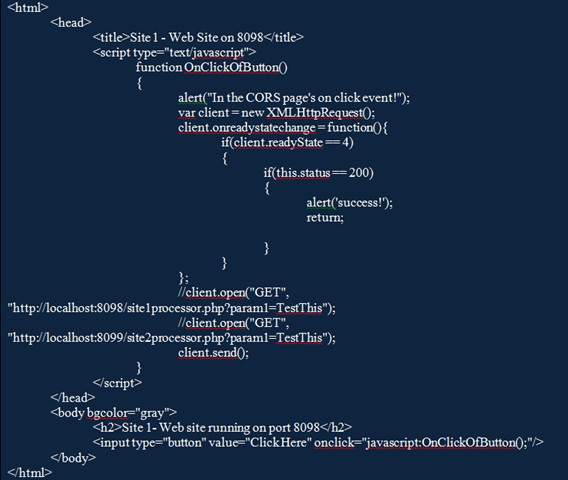
The code for each is as below: cors.php – Site 1 on port 8098 accessible via url: http://localhost:8098/cors.php image site2processor.php – Site 2 on port 8099 accessible via URL: http://localhost:8098/ site1processor.php  image site2processor.php – Site 2 on port 8099 accessible via URL: http://localhost:8099/ site2processor.php image I un-commented the following snippet in the cors.php file: image This request submits a request to the Site1 which is “same origin” as the cors.php. The request executes just fine and the “Success” alert pops up. No I comment the above code and un-comment the following snippet: image This request submits a request to Site 2 which is a different domain from the one where the cors.php file is hosted. Looking at the console windows of the developer tools (Chrome-F12) I see the following message: clip_image003 That is Site 2 does not permit access to its pages from any other domain. In case Site 2 wants to allow access to some content from other domains, there is an option to enable that: Access-Control-Allow-Origin header I tried the Access-Control-Allow-Origin header option by adding this header to the response from the site2processor.php file. The code for site2processor.php now looks like below: image What the above code change effectively does is allow access to the page site2processor.php hosted on Site 2 from Site 1. Now the following line of code is executed from the http://localhost:8098/cors.php the success pop up is displayed implying that the request was successful image

“No such host is known” error for new TcpClient socket connection set up

“No such host is known” error for new TcpClient socket connection set up using .Net Framework classes

I was trying to create a TcpSocket connection to check for .Net’s SSL certificate validation process and was using the TcpClient constructor of the System.Net.Sockets class.

The constructor has a signature like below:

public TcpClient(string hostname, int port)

The hostname is the DNS name of the remote host to which you intend to connect.

The code I wrote and the error was as below.

TcpClient clientFor = new TcpClient(“https://developers.facebook.com&#8221;, 443);

image

The funny thing is I put the uri for the host name instead of the DNS name L

The fix was simple:

TcpClient clientFor = new TcpClient(“developers.facebook.com”, 443);

Rails – Routes/resources

Routes in ruby are already confusing for a “new to ruby” person like myself. All my understanding of the fundamentals (read from http://guides.rubyonrails.org/routing.html) went for a walk when I saw the following in routes.rb file in one of the projects:

resources    :photos

AND

But the controller, PhotosController only contained definition for show.

Where are the other methods???

As usual http://stackoverflow.com/ came to the rescue and Miguel, Rajesh and Oliver provided the reasoning.

This note is to summarize the discussion on the thread here: http://stackoverflow.com/questions/18699721/rails-resource-controllers.

When some one defines a resource in routes.rb using the syntax above, Rails created the following routes for the 7 HTTP methods:

HTTP method Route Action
GET /photos index
GET /photos/new new
POST /photos create
GET /photos/:id show
GET /photos/:id/edit edit
PUT/PATCH /photos/:id update
DELETE /photos/:id destroy


If we want our application to take action on these method requests then we got to define these in the corresponding controller class, PhotosController.

In cases where the route is defined using [resources    :photos] and one or more of these action methods are not defined in the controller, Rails will throw an exception (code 500).

So what is the correct way to define only the action methods that we will use. As mentioned by Oliver/Miguel in the stackoverflow.com thread use definition like one of the following when defining the route:

resources :photos, only: [:show, :index, <other action methods you NEED>]

OR

resources :photos, except: [:create, :new, <other action methods you DO NOT NEED>]

Java ‘Mis’ adventures :) – Stumbling block 1 – Putting class files in different location then the source file

Creating package directory structure and putting class files in different location then the source file:

1. Create a folder structure that suits the purpose and taste. Here is what worked for me: clip_image001

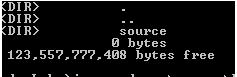
2. “Dir” inside Code_Labs: clip_image002

3. Creates and saved my .java (with package definition as the first line) in the source folder I created inside Code_Labs. clip_image003

4. Compile the code using the following command: clip_image004

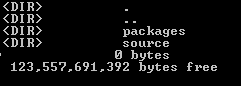
5. “Dir” inside Code_Labs again: clip_image005

6. Check that the class files are created inside the path provided in the package structure defined within the source file.

[After 3 hours of huffing and puffing…]

Struggled to execute the code I just took pain to create in a structured way. Thanks to Cameron’s short and simple explanation at http://stackoverflow.com/questions/5446700/java-class-execution-problem-java-lang-classnotfoundexception , finally got the code to run using the following syntax:

 clip_image006

Backtrack clean Hard Drive Install

Every time I try to install BT on a Virtual machine, I mess up the steps. So here is the relevant section from the site below.

Reference: http://www.backtrack-linux.org/tutorials/backtrack-hard-drive-install/

Backtrack clean Hard Drive Install

This method of install is the simplest available. The assumption is that the whole hard drive is going to be used for Backtrack.

Steps:

1. Boot the VM using the ISO

2. In the console type “startx” to get to the KDE GUI

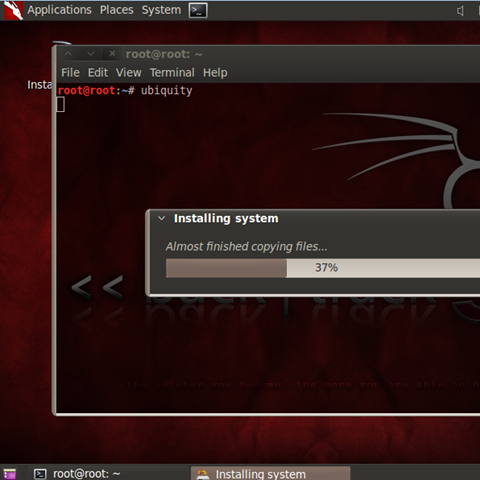
3. Open terminal and type ubiquity

4. Follow the instructions on the subsequent pages and at the end click Install

image

5. Allow the installation process to complete and reboot

6. Login to BT using default credentials, root/toor. Change the root password

7. Fix the frame buffer splash by typing “fix-splash” ( or “fix-splash800” if you wish 600×800 frame buffer), reboot.

Also, in a Linux virtual machine, shared folders appear under /mnt/hgfs, just in case 🙂

Finally: http://www.vmware.com/support/ws55/doc/ws_newguest_tools_linux.html

Python: Print to a log error

Issue:

While writing a script below to a log file:

with open(‘testfile.txt’, ‘wt’) as f:

print(‘Hello to the logs’, file=f)

with open(‘testfile.txt’, ‘rt’) as f:

for line in f:

print(‘This is what we printed to the log file : ‘ + line)

I was repeatedly getting the following error:

D:\Python\Scripts>python printtofile.py

File "printtofile.py", line 6

print(‘Hello to the logs’, file=f)

^

SyntaxError: invalid syntax

Resolution:

Source: http://docs.python.org/2/library/functions.html#print

from __future__ import print_function

with open(‘testfile.txt’, ‘wt’) as f:

print(‘Hello to the logs’, file=f)

with open(‘testfile.txt’, ‘rt’) as f:

for line in f:

print(‘This is what we printed to the log file : ‘ + line)

BSIMM in its 4th incarnation is here

The BSIMM4 came out on 09/17 and the BSIMM4 document is now available for download here.

BSIMM (pronounced “bee simm”) is short for Building Security In Maturity Model. The BSIMM is a study of real-world software security initiatives organized so that you can determine where you stand with your software security initiative and how to evolve your efforts over time.

Encoding notes around MvcHtmlString Class and <%: %>/@Model.<…> code syntax

The MvcHtmlString class:
Represents an HTML-encoded string that should not be encoded again. This class contains some interesting methods from security perspective like:

Create Creates an HTML-encoded string using the specified text value.
ToHtmlString Returns an HTML-encoded string that represents the current object.

The MvcHtmlString.Create method:
The Create method of the MvcHtmlString class in System.Web.Mvc namespace creates an HTML-encoded string using the specified text value in the parameter.

The method signature for the Create method is:

image

The <%: %> code syntax for the MVC ASPX engine:
<%: %> is a new syntax for HTML Encoding output in ASP.NET 4 and ASP.NET MVC 2. This syntax renders output like <%= %> blocks do, but at the same time, also automatically HTML encodes it before rendering.

Considering that ASP.NET 4 introduced a new IHtmlString interface (along with a concrete implementation: HtmlString) that a developer can implement on types to indicate that its value is already properly encoded for displaying as HTML, and that therefore the value should not be HTML-encoded again, a possibility of Double Encoding arises when <%:%> and instances of IHtmlString are used together.

To avoid this, <%: %> code-nugget syntax checks for the presence of the IHtmlString interface implementation and will not HTML encode the output of the code expression if its value implements this interface.

The @model.<…> syntax for the MVC Razor engine:
This syntax automatically encodes value that is represented by <…>. Only exceptions will be when <…> is of MvcHtmlString type.

Possible permutations:

<%: MvcHtmlString %> <%:%> will not encode the MvcHtmlSTring to avoid double encoding as this is assumed to be already encoded
<%: NormalString %> <%:%> will Html encode the NormalString before rendering the same.
@model. <somethingNonMvcHtmlString> This will be HTML encoded and rendered.
@model. <somethingMvcHtmlString> This will be not get HTML encoded as this is assumed to be already encoded somethingMvcHtmlString is already assumed to be encoded.

So why document these when these details are already available in MSDN/TechNet/web?
Because MvcHtmlString.Create method is not generating an HTML-encoded string as documented. And when these strings gets rendered within the <%:%> or @model.<…> syntax, they are not encoded and as a result a non-encoded string gets rendered into the browser.


Demo:
A small MVC 3 application is created just to check the workings of the Create method of MvcHtmlString class.
The application takes a user string and renders it into the browser. It provides us an option to render as a normal string or as a HtmlMvcString. The UI looks as below:

image

Once I click on Test, the content entered is rendered as below:

image

The view code that handles this rendering part is:

image The strUserString is a normal string object.
The data model to which this view is bound has the following code:

image

Now to check the encoding behaviour, we pass some script values and try to render it in the browser.
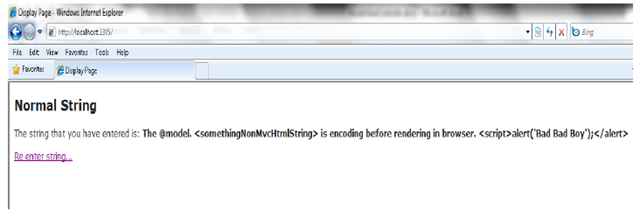
Behaviour for Normal String:

image

This text is encoded and rendered as below:

image

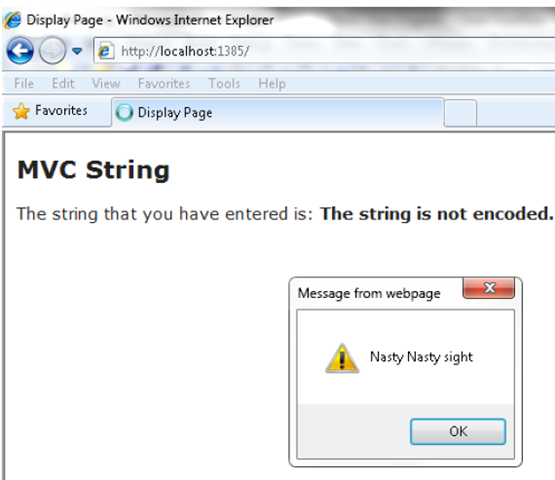
Now the same text is rendered as an MvcHtmlString type:

image

The output looks as below:

image

The MvcHtmlString.Create method did not encode the string as documented. This needs to be taken care of during code reviews particularly when values of type MvcHtmlString is rendered within the <%: %> code nugget expressions or in @Model.<…> in ASP.NET 4 and ASP.NET MVC 2 onwards.
<%: %> and @Model.<…> will NOT automatically encode an object of type MvcHtmlString.

Some points to keep in mind when reviewing ASP.NET 4 and ASP.NET MVC onwards:
1. Check for <%: %> and MvcHtmlString usage.
2. Check for @Model.XXXX and MvcHtmlString usage
3. If found, check the type of value that is being rendered between the <%: %> code nugget expressions. Same for @Model.XXXX
4. If the type is normal string, <%: %>/@Model.XXXX will HTML encode the value. But if the type is MvcHtmlString then the value rendered within <%: %> will not be encoded. So if you see <%: %> in code do not assume that every value within it is encoded by default.

References:
1. http://weblogs.asp.net/scottgu/archive/2010/04/06/new-lt-gt-syntax-for-html-encoding-output-in-asp-net-4-and-asp-net-mvc-2.aspx
2. http://stevesmithblog.com/blog/default-encoding-of-strings-in-asp-net-mvc-2/

The latest Cyber Risk Report from HP DVLabs

The latest Cyber Risk Report from HP DVLabs –

Good findings that analyzes:

  • The number of Web application vulnerabilities that are reported differs significantly from the number that actually exist.

  • Web application attacks are on the rise, despite the lack of new vulnerabilities being disclosed.

  • Web application vulnerabilities are easy to exploit with a variety of attack techniques and tools.