
Create a new VPC, provide the name and location and click finish. Once created click Start on the VPC Console.
The VPC will not be able to boot as there is no OS (it may try to get an IP and stuff, click Esc if it does). You will be prompted to provide the location of a bootable file.
Drag the ISO file and put it on the CD icon in the bottom of the VPC image. Hit Enter. The installation will start. Then follow the instructions on the screen.
VPC Image: Unable to connect to internet when using Wireless connectivity on Host machine
You may see a message “ LAN Cable is unplugged” or may be others. I struggled to get an answer over a day of my weekend. The solution is simple but as it took me so long to figure this out, I am writing it here. Hope it saves sometime for few.

Click the Network Connections (the last icon) on the VPC image. The “Settings for <> Window appears.
Select “Networking” and select appropriate wireless Adapter in the place holder for Adapter1 on the right hand side.
Once done…Bingo!!!…the internet just gallops..
Happy Learning!!!
Silverlight TextBlock and XSS
I am learning Silverlight, particularly the security perspective, and I created a dummy project. The project greets the user with a login screen and once the user provides the credentials he is redirected to another page and the user sees a Welcome note saying “Welcome “.


I assigned a script in the user name field and expected to see an nice little alert when the user is navigated to the next page but I saw this instead:
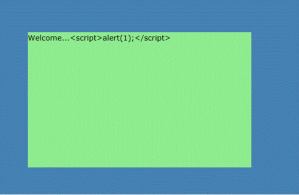
I am disappointed on seeing this and looked for why this text is not parsed and rendered by the browser. In the approach the syntax TextBlock.Text understands the string is to be displayed rather than parsed and run as markup/code and hence this cannot be exploited for Cross Site Scripting.
I did not know that and thought its worth noting it down here.
Cross Site Scripting – PART 1
Hi there…I have been looking around for XSS related information and most of the demos I saw are either around displaying an alert in a web page or too advanced for a beginner like me. So as a toddler in the security world I tried to create my own dummy application to see how this attack is executed. What I write below is a documentation of my learning: there may be faults as I am still learning.
So feel free to drop a comment incase anything is not correct, I will surely incorporate any suggestions.
Cross Site Scripting – A little exploit demo to help understand the basics of this attack – I
Application background:
1. We have a simple web forum that uses Form based authentication.
2. The users can comment on the topics discussed by other users.
3. New users visiting this site are required to register by creating a new user name and password.
4. A registered user can: view/write the posts, write comments on the posts and view the comments written by other users.
5. The following code snippet is added to the web.config file for this application. Please note that when request validation is disabled, any content can be submitted to a page; it is the responsibility of the page developer to ensure that content is properly encoded or processed.

Use Scenario:
1. A malicious user registers and logs in to the forum.
2. He picks a topic and clicks on Write comments. Here is what he writes and submits:

This comment will appear as below on the view comments page:
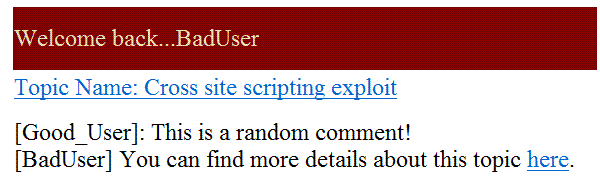
To a normal user this looks like a perfectly harmless piece of text that directs you to another location that has more information around, eh…well Cross Site scripting exploit!
So a good user (let’s call him GoodUser) logs in and clicks on the hyperlink “here” to get some more information around this type of exploits. Here is what he will see:

In our example we used a simple alert statement but in real world scenarios this can contain scripts that can steal your cookie, other important information, etc. These stolen information can be used to impersonate a user, launch a more knowledgeable attack on the application or its user and also can case loss of data that can have financial and reputational implications on both the end user as well as the web site owner.
Hope someone will find this useful to understand how XSS can be exploited. I will posting my rendezvous with XSS.
Happy Reading!
Bind data to a drop down list in a ASPX page
If you have a drop down list control that you need to populate on page load and you want todo it through code, here is how:
#1: DropDownList1.DataSource = obj.PopulatVehicleNumber();
#2: DropDownList1.DataTextField = “Vehicleno”;
#3: DropDownList1.DataValueField = “Vehicleno”;
#4: DropDownList1.DataBind();
Explanation:
In #1 I have created an object of a class that has the data base connectivity implementation. What #1 does is to fetch you a table that you assign as a data source to the drop down list control.
#2 defines the text field for the drop down list. This is the values that the users will see and select from. The DataTextField is a property of the drop down list control. This property specifies which field from the DataSource is to be bound to the Text property of each item in the control.
#3 defines the value field for the text mentioned in #2. This will be the value that you will typically use to make some decisions on. For example, supposing a user selects a text “United States” from a Country drop down. You may decide to assign this text a id of say ‘0001’ as the value. You may then take logical decisions based on this field.
#4 calls the DataBind() method to bind the data to the drop down list control. The control remains empty until data binding occurs. This method used to bind data from a data source (eg. database) to a server control.
That’s it!!
Configuring SQL Server 2008 server authentication modes
SQL Server 2008 supports 2 modes of authentication:
- Windows Authentication mode and
- SQL Server and Windows Authentication Mode
You can view the current authentication mode that the server is using the following steps:
- Connect to the Server using SQL Server Management Studio.
- Right click on the server name (the root of the tree that is displayed in the object viewer)
- On the properties window, select “Security”
- Under “Server Authentication” section, you will see the current authentication mode of the server. Change the authentication mode here if required.
You have to restart the server. If SQL Agent is running this also will require a restart.
You will need SQL Server sysadmin privilege to make any changes to the Authentication mechanism of the server. This decision should be taken after thorough evaluation of the system and various security aspects involved.
 Random Thoughtz